01
Local network discovery
The computer and miner should be connected to the same router or switch. Once the miner reports itself, the address can be used in a browser to access the device panel.
Download IP Reporter when you need a simple way to find the IP address of a supported ASIC miner on your LAN. The utility is commonly used during Bitmain Antminer setup, after router changes, or when a miner receives a new DHCP address.
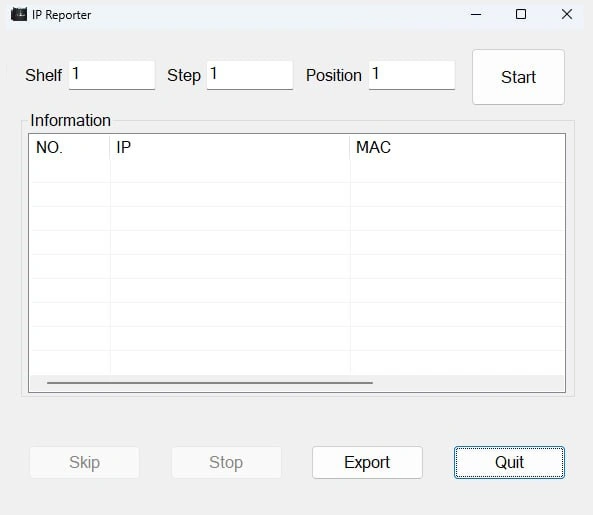
When an ASIC miner is connected to a router, it usually receives an address automatically through DHCP. The problem is that the owner often does not know which address was assigned. Instead of opening the router client list and checking every unknown device, IP Reporter provides a direct way to identify a compatible miner.
This is especially useful in small farms, repair benches, hosting rooms, and home mining setups where multiple devices may look similar in the network list. A clear IP address is the first step before opening the miner web interface, checking firmware, editing pool settings, or confirming the hash board status.
Use this tool after unboxing a miner, replacing a router, resetting network settings, moving equipment to another location, or connecting several miners to the same switch. It helps reduce guesswork and keeps the configuration process predictable.
The utility is not meant to be a large network administration suite. Its value is in doing one practical task quickly: helping you find the miner address so you can continue with normal configuration.
The computer and miner should be connected to the same router or switch. Once the miner reports itself, the address can be used in a browser to access the device panel.
Factory resets and firmware changes often restore automatic network settings. The utility helps identify the new address without manually testing many possible IP ranges.
Most users run the program from a Windows computer connected to the same LAN. The process is straightforward and does not require advanced routing knowledge.
Before starting, connect the miner by Ethernet and wait until it finishes booting. Make sure the computer is on the same network segment. Then launch the utility and use the report button on the miner according to the model documentation.
Plug the ASIC miner into your router or switch using Ethernet. Wireless connections are not normally used for this process.
Download IP Reporter from a trusted source, open it on the Windows computer, and keep the application visible while the miner is powered on.
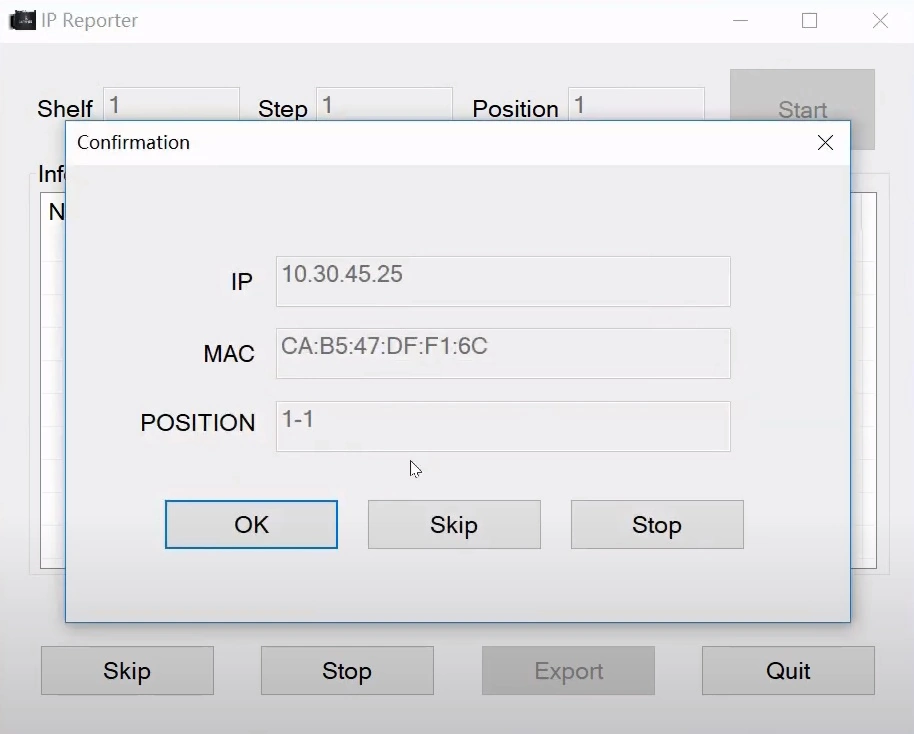
Use the physical IP report button on the miner. The detected address should appear in the utility window if the device is compatible and reachable.
Copy the IP address into a browser. From there you can review status, configure pools, update settings, or continue troubleshooting.
Use the utility when you need a quick starting point for miner configuration. Always verify the file source, avoid modified downloads, and keep a clean copy for future setup or service work.
If the address does not appear, the problem is usually related to network placement, boot timing, security software, or an incompatible device model. Work through the basics before assuming the miner is faulty.
The miner and computer must be on the same local network. Guest Wi-Fi, VLAN separation, VPN software, or strict firewall rules may block local discovery.
Many miners need several minutes before the control board is ready. Running the tool too early may produce no result even if the hardware is working normally.
If the utility does not show a result, the router client table can still help confirm whether the miner has received an address from the DHCP server.
A weak Ethernet cable, inactive switch port, or bad link negotiation can prevent discovery. Check link lights and test with known-good network hardware.
These answers cover the questions users usually have before using the tool for the first time.
It is used to find the local IP address of supported ASIC miners. Once the address is visible, you can open the miner dashboard in a browser and continue configuration.
Yes. The process happens inside the local network. The miner and computer must be connected to the same router or switch, but an external internet connection is not required for basic discovery.
No. This is not a universal scanner for phones, laptops, cameras, or printers. It is intended for compatible ASIC mining devices that support the reporting function.
Most home and office routers assign addresses dynamically. If DHCP settings change, the miner is reset, or the router is replaced, the device may receive a new address.
Use clean files from trusted sources only. Avoid repacked downloads and do not run unknown executables on work computers or sensitive systems.